Need content?
Ask your staff. Right? They all have stories, they are the experts.
And you already have a content plan, so the topic is set.
So blamo! Ask the staff to create and just wait for it to be done.
Wrong. We have already talked about all of the obstacles and then I shared some ideas on how to remove the barriers. The key will be to build up to the ask. And one of the best ways to build up to the ask is to progressively build skills and as you build the skills ask the participants to practice.
So where do you begin in this training?
With the basics.
Provide information about writing for each medium.
Web - concise, directed, bullets, data, transparent, keywords, audience oriented, purposeful
--read some good articles
Email - stories, links, call to action, news
--read some good articles
Social Media - when training you need to remember that they are all different. You can count on mass publishing for all of your content. You have to continuously show how to adapt content to audiences and the medium.
Facebook - personality, engaging, images, video, humor, questions
--read some good articles
LinkedIn - professional, jobs, volunteers, news, connections, collaboration
--read some good articles
Twitter - timely, replies, frequent, repeats ok, short, humor
--read some good articles
Not sure if you noticed what I did there. I started by talking about training your staff on how to write, but then send you to a bunch of good articles to read for yourself.
That's right, the first training that has to happen is that YOU realize that no matter how long you have been creating content for any medium, you need to take time to train yourself in order to train others. Take time to read articles (or at least scan them) to refresh your thinking, see new trends or pick up tips.
Then take the articles and use them as training tools. Pick the resources or articles that best match your org, your goals or your approach and share them in a central place for all staff. Using an outside source will establish authority and importance. Plus you don't have to do as much work.
Build your trainings around information that people can relate to. Don't get buried in showing them the steps.
An important note about training staff. Most of the time staff don't want the training until they are already in the middle of the process. They get started and realize they need some help. Make sure your trainings can be accessed at any time. Create cheat sheets, recordings, a list of resources, etc.
So finally, here is the key to all of this. Training staff for digital content needs to be approachable, regular, ongoing, focused on voice\style\approach and fun!
Showing posts with label content. Show all posts
Monday, December 17, 2012
Monday, October 8, 2012
Remove Barriers (Give staff a voice! Part 8 of 10)
Run inside, grab the brand new GPS, quickly open it and get those directions. But you have no idea how this thing even works and why does it suddenly have a voice like the Hulk? What button did you push?!? But a bit more fumbling and you got the directions.
Now rush to get gas. Finally on the road! But of course, construction and traffic. oy. If you only knew how to find an alternate route on this GPS or knew this area better!!! But you are afraid to leave the main road and get lost...
Ok, I think I have stressed you out enough or at least I have stressed myself out.
Content creation can have the same barriers which we talked about in the last post. So why did I create this story for this post instead of the last post? Well I don't know. Just kidding of course. I added the story to illustrate a key point in removing barriers:
Make your authors feel prepared and comfortable.
Being ready and used to the tools is a big theme in my very real road trip story. Come on, we have all been there.
Some keys to removing barriers:
Easy to use tools - make sure the tools fit the situation and skill set of users. If you don't need the Hulk voice option, don't provide it.
Training - Offer regular and on-demand trainings. Schedules are busy, so expecting people to attend and care about training on your schedule instead of theirs can really backfire.
Practice - Your trainings should NOT be a lecture. Make them use the tools. Require them to bring real content to work on in the training. And leverage every possible scenario to get them to practice using the tools. (examples - at staff meetings use the tools as a group, use tools internally as well)
Easy to access support - Provide "on-star" type support. Give them a website with cheat sheets and a real person that can access.
Have a plan - Make sure everyone has their directions, expectations and alternate routes.
Reduce fear - Build a team of champions and cheerleaders to make the tech more approachable and friendly. Share examples of use and success.
Snacks - every road trip needs snacks. (just seeing if you are paying attention)
Don't just expect your staff to jump in the car we call content and drive. Prepare them.
Tuesday, September 25, 2012
Identify Barriers (Give staff a voice! Part 7 of 10)
There is a fine line between excuses and barriers. Often our role is to know the difference without pointing fingers.
Sometimes the reasons staff give about why they can't use the technology are very real, other times they are just perception or defense mechanisms. It is easy to sit back and say "I don't know how", "I am too busy" or "That isn't my job."
These barriers are real to them though, so you need to address them either way. The difference is what you will change. People are quick to blame the tools, but we need to pay attention to the culture, policies, procedures, knowledge, priorities and experience that surrounds our digital content.
So what are the barriers between your program staff and content creation?
"Content won't be a part of my review, so why bother."
"I really don't see the value in creating that content, why does it matter to me?"
"My supervisor doesn't seem to think this is too important either...."
"I don't want to learn another new tool, don't I already do enough around here."
And many others.
But you need to cut through the perception and excuses to find the real barriers and start to break them down.
I would not start with asking everyone what the barriers are. This may encourage them to dig in their heels and stick to their excuses.
I would look to do a content channel inventory, author\owner org chart, tool catalog and content creation process map before getting opinions.
Content Channel Inventory - First gather a list of all of the different channels of content that need to be maintained. (Website, Blog, Email blast, Newsletter, Facebook, Twitter, Intranet, etc.)
Author\Owner Org Chart - For each of the channels above you should document who the primary owner is and list all of the authors that have access.
Tool Catalog - Create a list of all of the tools that are used to manage, create and share the content.
Content Creation Process Map - Break down the steps, authors and tools that are needed to manage each channel and then try to give the all of the channels some sort of overall structure.
This is just a beginning to the type of inventory and process map that you should have, but it is a good start to help you identify what the real barriers are.
Monday, August 27, 2012
Prepare your staff (Give staff a voice! Part 5 of 10)
Imagine sending one of your staff members to a press conference without any notice, without telling them what to talk about. Just train them about what a press conference is and how it works. Then hope for the best.
Yeah, it's like that.
It is easy to memorize a speech and post prepared content. It is not easy to manage a community and reply to the tough questions.
We can spend as much time as we want training people how to use social media, how it works, how to create good content, but do we prepare them for the questions, flashing cameras, criticisms and onslaught of a press conference?
In social media you have to expect some unhappy people, some trolls (people who like to complain and start fights) and some mistakes. Do we do enough to make our staff ready?
In our trainings we focused on what our staff were already comfortable with. We started with talking about what people call about the most. We then talked about what are the most common and most difficult questions they get in their onsite comment boxes. We asked them to think through their replies that they use in person. Then we helped translate those to an online situation.
The big trick is deciding when to reply, how much to say and knowing when to take it offline.
One big thing we emphasized was to not to jump to deleting a post or banning a user. Can you say backfire?
Our training was two parts.
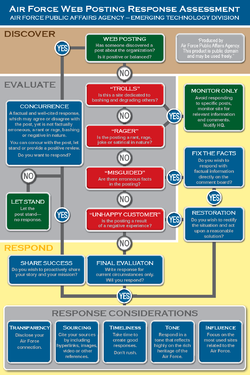
Motivation - First we used the Air Force blog response chart to talk about how to understand WHY people are commenting. Because understanding motivation is key to the reply.
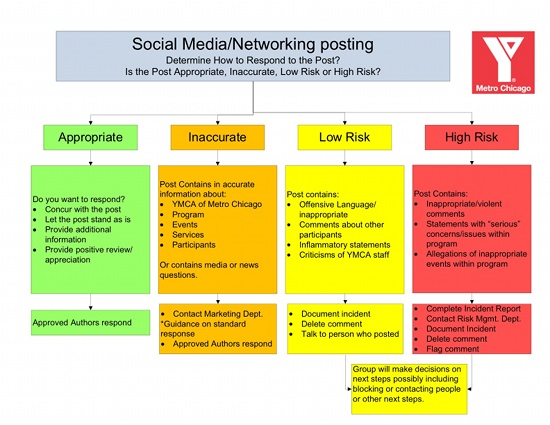
Respond - Then we had a comment response chart of our own to help them to decide if and how to reply\act.
That was our idea of how to prepare them.
Thursday, August 9, 2012
Recruit your team, define the roles (Give staff a voice! Part 4 of 10)
Social Media is marketing so they will do it.
Nah, Social Media is all Tech so they will do it.
Wait, we are raising money right now so let the Fundraising team do it.
Nobody steps up, takes leadership and establishes a rule book, so eventually something bad happens or there are conflicts in what gets posted. Then all collaboration breaks down and one person or a small team controls everything. All posts have to be approved and everything gets filtered. In some ways that may seem appealing. And if that is the accepted culture in your org, then you may as well stop reading this post because you won't be enabling anyone...
But if you are ready to collaborate within defined roles with the same playbook, then read on.
But the key is to know who will play each of the roles.
- Listening- who will be out there actively scanning for what is being said about your org, cause or brand
- Monitoring- who will watch your channels for questions, comments, problems, inactivity, etc.
- Managing- who will keep the tools working, identify tech changes, administer permissions, etc.
- Planning- who will create the content calendar, define themes, focus the communications, define content frequency, etc
- Posting- who be creating the content, keeping the pages updated, etc.
- Promotion- who will spread the word about your social media efforts, run contests, create custom pages\content
And there may be more roles, but that is a good start. You might enjoy this article from the Content Marketing Institute to dig deeper.
Once you have the team and the roles then you need a Playbook. The glue that will hold this together is a content calendar (editorial calendar). As possible to supplement this content calendar there should be content templates. As the themes and business goals are defined, you can create standard text, flyer formats, images and other reusable content for others to pull from.
Here are some awesome articles on creating an editorial Calendar and process:
How To Create the Online/Offline Editorial Calendar - Razoo
DIY TOOLS FOR SOCIAL MEDIA MANAGEMENT - Amy Sample Ward
11 Editorial Guidelines Every Business Blog Needs - Hubspot
In my next post I will talk about the Comment Escalation Chart and how to make people comfortable with responding.
Monday, July 16, 2012
What Gets Measured, Gets Done (Give staff a voice! Part 2 of 10)
"What gets measured, gets done." I have heard that said many times from a number of different people. It is so simple and true. HOWEVER, numbers and data are not as useful without a tie to goals and without context.
The first step in our process to enable digital editors was to create a set of metrics. We decided we wanted to keep the number of metrics fairly simple, balance reach vs. engagement and allow for comparison. We also set a goal for each of the metrics based on nonprofit benchmark reports, similar org stats and some simple math.
So our spreadsheet ended up with a row for each location, one section of columns for reach (size of audience) and one section of columns for engagement (audience interaction). The numbers do not paint a comprehensive picture for a detailed analysis, but they do provide enough insight to identify trends and gage performance.
And recently we have added a new section for Post Frequency. We are showing the # of blog posts on the website, date of last blog post, # of posts by admin on Facebook page and date of last admin post on Facebook. A key to our strategy is consistent and current content. The addition of these columns allows our leadership to easily review progress.
So we are measuring the work. So now what? stay tuned...
Tuesday, July 3, 2012
Getting Content Strategy started (an inner voice argument)
Ever feel like you are arguing with yourself?
Well I did that this morning on Twitter using my alter ego, I let my inner battle go public.
First, I found this great article! So I Scooped it.
Well I did that this morning on Twitter using my alter ego, I let my inner battle go public.
First, I found this great article! So I Scooped it.
But then I had a thought. So I posted from my other Twitter account:
yeah, ok
yeah but
nice
ah, yeah
cool
yep.
And that is a small glimpse of an inner argument. I usually win.
Monday, May 7, 2012
Program Staff as Digital Editors
Content requires work and skill. Lots of people just ignore that fact. They get all excited about content strategy, communication plans and social media. But they hardly ever spend time talking about how to equip their staff to be content creators.
Some orgs look to hire copywriters, publishers or whatever. But I like to look for ways to build up all staff with the skills that they will need going forward with every job of the future. Here is a presentation that I did about this topic. I hope it is useful.
Thursday, February 23, 2012
22 Ways to Create Compelling Content When You Don’t Have a Clue [Infographic] - share!
I stumbled across, well actually not stumbled, I found this in my Google Reader. Anyway, do you really care how I found it?
Since I haven't had enough time to write, just share someone else's brilliance, right?
22 Ways to Create Compelling Content When You Don’t Have a Clue [Infographic]
Like this infographic? Get more content marketing tips from Copyblogger.
Since I haven't had enough time to write, just share someone else's brilliance, right?
22 Ways to Create Compelling Content When You Don’t Have a Clue [Infographic]
Like this infographic? Get more content marketing tips from Copyblogger.
Monday, January 30, 2012
5 Ways to get Digital Content from Program Staff
Fresh content is a key element of a good website, we have all heard that, right? But a simple concept does not mean it is easy to make happen.
One of my favorite posts I have ever written was 5 secret ways to trick your colleagues into becoming content creators for your website.
I have been thinking about this more and I have a few more thoughts. Even today as technology becomes more common, many people are hesitant to create content for a website or email newsletter. So how do we get this content created?
Yeah, I know there were 6, but consider it a bonus.
How do you get program staff to contribute digital content?
One of my favorite posts I have ever written was 5 secret ways to trick your colleagues into becoming content creators for your website.
I have been thinking about this more and I have a few more thoughts. Even today as technology becomes more common, many people are hesitant to create content for a website or email newsletter. So how do we get this content created?
- Fill in a printed marketing worksheet - create a simple worksheet in the format of the content that you want them to create. Keep it short and simple.
- Regularly scheduled collection with feedback - practice makes perfect. Or as my wife says practice makes permanent. This means that if if you practice something wrong , it becomes hard to learn it the right way. So while it is a great idea to gather content from staff of you never provide feedback, how will they improve?
- Recorded phone call - want a deeper story or article? Get a group of program staff on the call, ask the right questions and let the conversation happen. But don't forget the key part, record it. It is better to record it and take your notes later, that way you aren't distracted on the call.
- Join their meeting - talk to them on their territory. Don't ask questions, just listen. If you need to ask questions, consider prepping one of the program staff to lead and ask the questions to make them more comfortable.
- Ask them their story - every staff member has a story about why they work there, why they love the mission or some great experiences. Give them a chance to tell their story.
- Identify the barrier - staff will always have excuses about why they don't create more digital content. Look past the excuses go find the real barriers, is it the tools, unclear benefit to their work, fear of making a mistake or ??? Then find a way to help break down those barriers.
Yeah, I know there were 6, but consider it a bonus.
How do you get program staff to contribute digital content?
Thursday, October 27, 2011
Scoop it for you, Delicious for later, Reader for me.
So it seems that content curation is all the rage, but hasnt it been around since the beginning? You find a good newspaper or magazine article, you cut it out and share with a friend. Right?
Well anyway, it seems that I have jumped on the bandwagon on this one. I have been having a blast with my sccop.it topic on digital content and nonprofit tech. But I have learned a few things from it already.
TOPIC: Pick a topic that really excites you, not something that will be like work for you to find content on. But even more important, be specific! When you dig for gold, you dont create piles of metal, dirt and other, you create piles of each specific type of precious metals.
FOCUS: When you decide to start curating, you should focus on themes and pay attention to what others like.
PATTERN: Create a pattern of when and how you curate your topic. You can see mine below.
SHARE: Go ahead and share your curated content on Twitter, LinkedIn and Facebook. HOWEVER! Do not SPAM. Your followers on Twitter, LinkedIn and Facebook may overlap, but more importantly they are people, not mindless drones. Think through which audience to share with and share selectively, dont just send it to all social networks just cuz its easy.
Well anyway, here is how I curate my content:
- Subscribe to a ridiculus number of RSS feeds on good Nonprofit, content marketing, social media and other Blogs (most of which someone else curated and told me it was a good blog)
- As time allows I use Google Reader to scan theses posts. As I find a post that I want to read closer, tag for reference or share with others, I star that entry in Reader.
- NOTE: I almost always scan my Google reader on my phone (on the train or wherever I am just sitting around). The reader app on my android phone rocks. I am able to scan through hundreds of posts quickly, granted I may miss some gems because I base so much of my decision on title, but ehhh.
- Each Day (yeah, I do try to do this every day):
- Open Google Reader and pick a random spot amongst all of my starred items
- Open each starred item and decide what to do with it
- Read again and unstar
- Take an action like register for webinar or download a file (which is easier on my laptop) and unstar
- Add the blog entry to my Delicious.com account for future reference
- NOTE: i have a new tag of DCSToDo, which is my list of links that I need to get back to soon to take an action
- Scoop.it! If the content fits my topic and I think others would find it valuable.
- NOTE: I dont share everytime I Scoop.it. I only share about 2/3 to my Twitter account and only 1/15 to my Facebook or LinkedIn.
Anyway those are my thoughts on content curation. The last question that I get all the time is, "How do you like Scoop.it"? I try not to answer that question too much. The tool is not as important as why and how you use it. Scoop.it fits great into the flow that I have created above, it is easy to use, fast to post to, it is trendy so gets some extra attention, etc. But my favorite part is how the pages are created visually but it isnt overdone. Some of these new visual toys bury the information and make it pretty but useless.
Tuesday, October 18, 2011
Enabling Program Staff to Become Digital Content Editors
So I have been busy writing a long blog post for NTEN and have neglected my own blog. So rather than write another post, I will just share a link to the blog post on NTEN.
A BIG THANKS to Debra Askanase (http://www.communit yorganizer20.com), Jason Dobrolecki and John Oliver people for their help with this article! They read it for me and made it so much better. Thanks!
Here is what it covers:
http://www.nten.org/blog/2011/10/14/enabling-program-staff-become-digital-content-editors
A BIG THANKS to Debra Askanase (http://www.communit
Here is what it covers:
Elements to enable digital editors:
- Publish metrics (recognition, competition, feedback)
- Establish structure and accountability
- Remove barriers
- Regular training and resources
- Enable individuals while managing the brand
It’s important to note that the type of content an organization wants to publish should be identified by its communications department, and the process for gathering that content (which is what I write about below) should be developed in collaboration between the communications and technology departments.
http://www.nten.org/blog/2011/10/14/enabling-program-staff-become-digital-content-editors
Thursday, March 11, 2010
How to Write a Mission Statement That Doesn't Suck
This awesome video from Fast Company says a lot in just a few minutes. I know I could not have said it better.
And I dont think this just applies to our mission statements. I think you can use the ideas in this video to apply to a lot of the content, messaging and stories we write. How many times have you written something that you think is great, only to have it edited so much that you cant even remember why you wrote it.
We try to appeal to too many audiences, make sure all of our bases are covered. By covering all the bases, you are diluting the message.
Lets all try to be more concise and say what we mean, skip the buzz words and trying to say it all. Say what is important and end it.
Tuesday, December 1, 2009
Communicate Online like a Kenyon (Part 9 of 11 on Managing Tech 2 Meet Mission)
"Imagine your online communications are kept attractive, accurate, coordinated, and up-to-date in only hours a month. Fresh, engaging content flows like water, bringing a steady stream of new and returning visitors. Your every fundraising, educational, or advocacy campaign's online components spark throngs to action. You are safe in the knowledge that you have a plan flexible enough to keep you nimble yet solid enough to keep you prepared and help you weather unexpected challenges."
"All this is achievable for nonprofits with the right planning--along with the knowledge, skills and will to improve."I will buy a bazillion of whatever John Kenyon is selling! Seriously, did you read that opening from his chapter in the NTEN book? I usually try to start my blog post with a witty opening, but I learned never to enter a mind battle with John when death is on the line (oops started to slip into Princess Bride talk, do you have six fingers on your left hand?)
Anyway, I can honestly say that John has a skill in his writing and presenting that makes everything seem possible and is easy to understand. And what I like most about John's chapter and everything he does, is that he doesnt get caught up in the hype of the latest craze or that cool tool. He focuses how to enable the organization, the mission and the people to make a difference.
I learned a lot from John about the four C's of a website (credibility, cultivation, clickability and content) and the cornerstones of an email campaign (personal, targeted, integrated and trackable). He lays out a very doable course of action for any nonprofit to have a successful online communication strategy.
My struggles coming from a large and long standing nonprofit come in many forms:
- Building a consensus on message - we offer so many different services in wide ranging neighborhoods, populations and sectors that it is hard to focus.
- Communicating internally first - it is hard to communicate to our fans when we dont always communicate well with each other
- Marketing, fundraising, emergency or public service - often our immediate needs of meeting budget and getting through today drive our messages, not our mission and vision
- Changes in leadership - in times of transition when short term stop gaps lead rather than long term strategic plans it is tough to build sustainable messages
- Creating urgency in messaging - how do you create urgency in a message when the things you fight (Diabetes, obesity, health) are all gradual in nature
- Changing a brand - our brand has many traditions, fans and stereotypes, only some of which are true, it seems harder to change someone's mind rather than show them something new
I know, usually a blog posting is more about a solution rather than listing challenges, but this is my blog so I can do what I want. And here is what I want! I want John Kenyon to post a counter blog post and help me! So anyone that reads this should nudge John Kenyon to help out this poor blogger.
Over 11 weeks I am doing a themed series of blog posts. Each week I will write about a chapter of the book called Managing Technology to meet your Mission. This week is on the 9th chapter by By John Kenyon called Effective Online Communications. You should totally buy the book. (In case you are wondering, I am volunteering to do this, I am not getting paid or in any other way reimbursed for this. I just love NTEN and their events.)
Monday, October 6, 2008
5 secret ways to trick your colleagues into becoming content creators for your website.
Shh, don't share the following with ANYONE! Keep it to yourself and trick your colleagues at work into becoming the content creators that you know they can be.
One of the biggest complaints I have heard over and over again is that it is hard to get staff at organizations to contribute to content to the website. The IT or tech team should not be the ones writing the content of the website. Nor should it only be the marketing staff, who wants a web site full of marketing pizazz.
But our staff are so busy that they just dont have time to contribute solid content to populate the site. Well here is my list:
Top 5 Ways to trick your colleagues into becoming content creators for your website.
6. Job description. This may seem like you are forcing people, but you have to look at this as just part of their job. Work with supervisors, HR, "C" level staff, etc. to get web site content into all of the appropraite job descriptions. Even if you cant get it into existing ones, there are always those new hires. Now granted, this wont automatically make the content good or even make it happen, but at least their is a small awareness.
5. Three ring binders. Look around for things and pieces of information that people have thought is important enough to keep in a written format like a three ring binder. YMCAs are famous for having a whole shelf of these at the front desk and in every YMCA program directors office. Find what is most useful and repopulate that content into your intranet or web site.
4. Ease it in. Start with an intranet, instead of a public website. Get people involved in our intranet. Get them used to using the web to submit content. Do simple things like a discussion board, a book club, transferring manuals from paper to web, write stories about their background, etc. Get people to start a wiki, start with a small group, then brag about how cool the project is. Then others will want to join.
3. Competition. Pick a couple people that you know are ready to give content, then get that published on your site. Then go overboard in recognizing those staff within your org. A few others will want to join in based on that. Then continue to publicize the people that are contributing. Maybe even create a quarterly award for best content, include a free day off and a cool tshirt. But the most important key is to get those people not contributing wondering why they arent involved.
2. Bribery. Bribe them with food and hold an in-person meeting. Schedule a meeting focused on a topic that you need content for on your site. Then invite the people that have knowledge on that topic to a meeting and serve some pizza, ice cream or something. Get them talking and have someone take notes. Take a quick break. Have someone fast and furious rewrite those notes into some sample content for site. When people return, show them the content and have them react and help rewrite. Then publish and be sure to give all the credit to those people.
1. Steal it. Ask your colleagues a question in an email and dont tell them you plan to reuse it on the web. Just ask a question. Take their reply and rework it as content. Then send it back to them with this quote, "WOW, I was so impressed with your answer that I would love to have this content on the org web site. I attached what it could look like. Could I get your permission to post this?" But dont stop with stealing emails. Look for content to "steal" from discussion boards, memos, handwritten notes, brochures, presentations and more!
See what I did! I tricked you also! I said there were five and I wrote six. OK, I only did that because a top 5 sounds cooler than top 6.
Any Hoot. I would suggest by first trying to figure out what the biggest barriers are at your org. Is it a fear of tech? A feeling they arent the expert? A lack of time or resources? Unsure of what to write? The key is to get them to write that first peice, get permission and show that person how smart and great they truly are (BUT BE GENIUNE!), then next time maybe they submit it more willingly.
I am not claiming to be an expert on any of this, but obviously I was smart enough to trick you into reading this. Maybe now I can trick you into writing a comment?
Subscribe to:
Posts (Atom)