Monday, October 8, 2012

Remove Barriers (Give staff a voice! Part 8 of 10)


Road Trip! The excitement builds as you jump in the car and crank the music! Then you realize you forgot to get directions and didn't fill the gas tank. OK, deep breath.

Run inside, grab the brand new GPS, quickly open it and get those directions. But you have no idea how this thing even works and why does it suddenly have a voice like the Hulk? What button did you push?!? But a bit more fumbling and you got the directions.

Now rush to get gas. Finally on the road! But of course, construction and traffic. oy. If you only knew how to find an alternate route on this GPS or knew this area better!!! But you are afraid to leave the main road and get lost...

Ok, I think I have stressed you out enough or at least I have stressed myself out.

Content creation can have the same barriers which we talked about in the last post. So why did I create this story for this post instead of the last post? Well I don't know.  Just kidding of course. I added the story to illustrate a key point in removing barriers:

Make your authors feel prepared and comfortable.

Being ready and used to the tools is a big theme in my very real road trip story. Come on, we have all been there.

Some keys to removing barriers:

Easy to use tools - make sure the tools fit the situation and skill set of users. If you don't need the Hulk voice option, don't provide it.

Training - Offer regular and on-demand trainings. Schedules are busy, so expecting people to attend and care about training on your schedule instead of theirs can really backfire.
Practice - Your trainings should NOT be a lecture. Make them use the tools. Require them to bring real content to work on in the training. And leverage every possible scenario to get them to practice using the tools. (examples - at staff meetings use the tools as a group, use tools internally as well)

Easy to access support - Provide "on-star" type support. Give them a website with cheat sheets and a real person that can access.

Have a plan - Make sure everyone has their directions, expectations and alternate routes.

Reduce fear - Build a team of champions and cheerleaders to make the tech more approachable and friendly. Share examples of use and success.

Snacks - every road trip needs snacks. (just seeing if you are paying attention)

Don't just expect your staff to jump in the car we call content and drive. Prepare them.


Tuesday, September 25, 2012

Identify Barriers (Give staff a voice! Part 7 of 10)

There is a fine line between excuses and barriers. Often our role is to know the difference without pointing fingers.

Sometimes the reasons staff give about why they can't use the technology are very real, other times they are just perception or defense mechanisms.  It is easy to sit back and say "I don't know how", "I am too busy" or "That isn't my job." 

These barriers are real to them though, so you need to address them either way. The difference is what you will change. People are quick to blame the tools, but we need to pay attention to the culture, policies, procedures, knowledge, priorities and experience that surrounds our digital content.

So what are the barriers between your program staff and content creation?

Time was the most common barrier that I heard in the form of "I am too busy" or "that isn't my job." But what I usually heard under that was:
"Content won't be a part of my review, so why bother."
"I really don't see the value in creating that content, why does it matter to me?"
"My supervisor doesn't seem to think this is too important either...."
"I don't want to learn another new tool, don't I already do enough around here."
And many others.

But you need to cut through the perception and excuses to find the real barriers and start to break them down.

I would not start with asking everyone what the barriers are. This may encourage them to dig in their heels and stick to their excuses.

I would look to do a content channel inventory, author\owner org chart,  tool catalog and content creation process map before getting opinions.

Content Channel Inventory - First gather a list of all of the different channels of content that need to be maintained. (Website, Blog, Email blast, Newsletter, Facebook, Twitter, Intranet, etc.)

Author\Owner Org Chart - For each of the channels above you should document who the primary owner is and list all of the authors that have access.

Tool Catalog - Create a list of all of the tools that are used to manage, create and share the content.

Content Creation Process Map - Break down the steps, authors and tools that are needed to manage each channel and then try to give the all of the channels some sort of overall structure.

This is just a beginning to the type of inventory and process map that you should have, but it is a good start to help you identify what the real barriers are.

Wednesday, September 12, 2012

Set Expectations (Give staff a voice! Part 6 of 10)

Training staff isn't enough.

Just because someone knows how to do something, doesn't mean they will do it.

People need to know what is expected of them, what is in it for them and what success looks like. Training people on the steps and process does not help with this.

I have often heard it said that kids will live up to their expected potential, not their actual potential. I think the same holds true with staff and technology.

If we treat them with kiddie gloves and expect only minor activity, then that is what we will get. But if we set clear, reasonable expectations, remove barriers, reward behavior and document success, then we can help them achieve their actual potential.

Technology and soon digital content, will be a part of a majority of jobs. We are doing our staff a diservice if we ignore this and shield them from this responsibility.

As a part of our effort to enable digital efforts we worked to set expectations of:

  • Posting to the website weekly as a team as a minimum
  • Posting to Facebook 2-3 times a week as a minimum, prefer daily
  • Update website information regularly (hours, staff, schedules, etc)
  • Sending a monthly email blast that contains more than just promotion
  • Balance all content (third=promotion, third=sharing stories, third=informative)
  • Monitor comments and reply daily
  • Reply to all contact us and tour requests from our website
  • Manage any new functionality or apps added to Facebook pages
  • Keep 2 staff trained as authors for digital channels for each center
And we had more. But the key isn't making a list of rules and regulations. Rather the key is to provide insight on WHY these are important and how they impact their job, plus make it easy for them to meet these expectations.

Also make it very clear what support they can get from IT, Marketing and other management resources. This has to be a shared responsibility.

Beyond listing the tasks they are responsible for, you should set the tone for behavior.  Most places have an employee policy that lists all of the things that staff can NOT do.  But do you have a list for your digital content of what they SHOULD do?

You can look over our manual and policies which attempted to balance these different things. But we used regular emails, metrics, reports and trainings to keep these expectations clear and in the front of the conversation.

Anyway, the point is we can't just train and give a set of rules. We need expectations to be set.

Small Org Digital Content Starter


What does your 

Online Brand Presence look like?


Word of Mouth has always been the best way for people to find out about the Y!

However, Word of Mouth has changed, people often share online instead of in-person. Do you have an online presence that allows, no scratch that, encourages online Word of Mouth about your Y?


Get a Jump Start!
It is hard to find the time to get started and learn to use the tools.  I can help. I will walk you through how to create and manage your presence. Once we are done, you will know how to use these tools for your organization.

Google Places – Claim your Google+ Place to ensure you are found with the correct information in Google search. I will also show you the same process in Bing and Yahoo.

Google Analytics – Configure Google Analytics to track your website traffic and teach you the basics on how to monitor it.

Google AdWords Grants – If you qualify, I can help you apply and setup your FREE Google AdWords to improve your

Facebook Page – Create a page for your locations, learn the different settings and how to manage them. I will also give some content and posting advice to get engagement.

Twitter – Establish and learn to use a Twitter account for your org.

LinkedIn Company Page – Great way to attract staff and volunteers, but also a good way to build connections to find donors.
 
YouTube Channel – nonprofits can apply for a free YouTube channel to have access to deeper functionality and more exposure. I will show you that process.

Email Blast System – If you have an existing email blast solution I will review your use of the tool and provide some advice. If you don’t have an email blast solution, I can help provide some choices (including free ones) and help you get started.
 
Website – If you have an existing website I will provide a review and some tips to improve your content, messaging, structure and design. If given access I can also review your website analytics to provide some insight. If you do not have a website, I can install and configure a WordPress blog to get you started and teach you to maintain it. Or if you are looking for something more comprehensive and pre-built, I have some options for you to choose from.

Pricing


One Price. We will work together on all of this for one price established before we begin. There will be overages or additional hours, we work till we are done. The price depends on how many options you choose and the size of your org, but starts at $500.

Hourly. I charge an hourly rate of $40-75 an hour. This makes the one price package above very attractive.

Thursday, August 30, 2012

Up For Hire!

Hello everyone!

I am diverting from my typical blog posts to make an announcement. I was laid off from my position at the YMCA of Metro Chicago and am now seeking new employment or consulting\contract opportunities. I am still a stronger supporter of the YMCA cause and mission! I hope to find a way to still belong to the movement that has impacted my life in so many ways.

But it is time to begin a new chapter in the story that is Steve. My career has been anything but traditional. Although I have only held two jobs over the last 14 years, the number of roles that I have played in those organizations is vast. Between the big picture, best practice, national scope at the YMCA of the USA to the tactical, hands-on, one man team at the YMCA of Metro Chicago, I have a wide range of expertise.

You can learn more about me with a fun little PowerPoint!

As this change was unplanned, I am open to either finding a permanent position or working on some consulting\contract project work.  I have written up descriptions of the type of services that I can offer, but they include:

  • IT Alignment Planning and Assessment
    • Business Process Improvement
    • Software Selection
  • Digital Content
    • Social Media Planning and Assessment
    • Website Content Management System Strategy\Setup
    • Content Strategy
    • Content Creation
    • Storytelling Development
    • Listening Post and Social Media Management
  • Staff Training
  • Executive Staff Private Social Media Training


I have a vast network in the Nonprofit Technology Community that can vouch for me, my skills and my expertise, if you would like references, please let me know.

Thanks everyone for your support and I look forward to working with you!

Monday, August 27, 2012

Prepare your staff (Give staff a voice! Part 5 of 10)

Imagine sending one of your staff members to a press conference without any notice, without telling them what to talk about. Just train them about what a press conference is and how it works. Then hope for the best.

Yeah, it's like that.

It is easy to memorize a speech and post prepared content. It is not easy to manage a community and reply to the tough questions.

We can spend as much time as we want training people how to use social media, how it works, how to create good content, but do we prepare them for the questions, flashing cameras, criticisms and onslaught of a press conference?

In social media you have to expect some unhappy people, some trolls (people who like to complain and start fights) and some mistakes.  Do we do enough to make our staff ready?

In our trainings we focused on what our staff were already comfortable with. We started with talking about what people call about the most. We then talked about what are the most common and most difficult questions they get in their onsite comment boxes.  We asked them to think through their replies that they use in person. Then we helped translate those to an online situation.

The big trick is deciding when to reply, how much to say and knowing when to take it offline.

One big thing we emphasized was to not to jump to deleting a post or banning a user. Can you say backfire?

Our training was two parts.
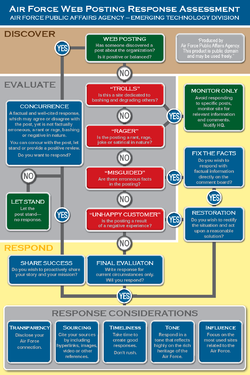
Motivation - First we used the Air Force blog response chart to talk about how to understand WHY people are commenting. Because understanding motivation is key to the reply.
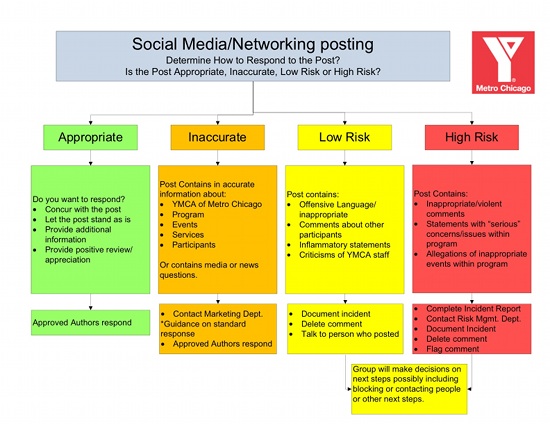
Respond - Then we had a comment response chart of our own to help them to decide if and how to reply\act.


That was our idea of how to prepare them.

Thursday, August 9, 2012

Recruit your team, define the roles (Give staff a voice! Part 4 of 10)

Social Media is marketing so they will do it. 

Nah, Social Media is all Tech so they will do it.

Wait, we are raising money right now so let the Fundraising team do it.

Nobody steps up, takes leadership and establishes a rule book, so eventually something bad happens or there are conflicts in what gets posted. Then all collaboration breaks down and one person or a small team controls everything. All posts have to be approved and everything gets filtered. In some ways that may seem appealing. And if that is the accepted culture in your org, then you may as well stop reading this post because you won't be enabling anyone...

But if you are ready to collaborate within defined roles with the same playbook, then read on.

First document who will be on the team, heck maybe even have tryouts or an application process. There are a number of ways to go about this. You could collect everyone that is interested and then determine what role and permission they will get. Or you could establish the structure and roles, then identify the people to fill them. Another approach would be to start small with some experienced players and grow as you learn what works.

But the key is to know who will play each of the roles.

  • Listening- who will be out there actively scanning for what is being said about your org, cause or brand
  • Monitoring- who will watch your channels for questions, comments, problems, inactivity, etc.
  • Managing- who will keep the tools working, identify tech changes, administer permissions, etc.
  • Planning- who will create the content calendar, define themes, focus the communications, define content frequency, etc
  • Posting- who be creating the content, keeping the pages updated, etc.
  • Promotion- who will spread the word about your social media efforts, run contests, create custom pages\content


And there may be more roles, but that is a good start. You might enjoy this article from the Content Marketing Institute to dig deeper.

Once you have the team and the roles then you need a Playbook. The glue that will hold this together is a content calendar (editorial calendar). As possible to supplement this content calendar there should be content templates. As the themes and business goals are defined, you can create standard text, flyer formats, images and other reusable content for others to pull from.

Here are some awesome articles on creating an editorial Calendar and process:
How To Create the Online/Offline Editorial Calendar - Razoo
DIY TOOLS FOR SOCIAL MEDIA MANAGEMENT - Amy Sample Ward
11 Editorial Guidelines Every Business Blog Needs - Hubspot

In my next post I will talk about the Comment Escalation Chart and how to make people comfortable with responding.