Monday, August 27, 2012

Prepare your staff (Give staff a voice! Part 5 of 10)

Imagine sending one of your staff members to a press conference without any notice, without telling them what to talk about. Just train them about what a press conference is and how it works. Then hope for the best.

Yeah, it's like that.

It is easy to memorize a speech and post prepared content. It is not easy to manage a community and reply to the tough questions.

We can spend as much time as we want training people how to use social media, how it works, how to create good content, but do we prepare them for the questions, flashing cameras, criticisms and onslaught of a press conference?

In social media you have to expect some unhappy people, some trolls (people who like to complain and start fights) and some mistakes.  Do we do enough to make our staff ready?

In our trainings we focused on what our staff were already comfortable with. We started with talking about what people call about the most. We then talked about what are the most common and most difficult questions they get in their onsite comment boxes.  We asked them to think through their replies that they use in person. Then we helped translate those to an online situation.

The big trick is deciding when to reply, how much to say and knowing when to take it offline.

One big thing we emphasized was to not to jump to deleting a post or banning a user. Can you say backfire?

Our training was two parts.
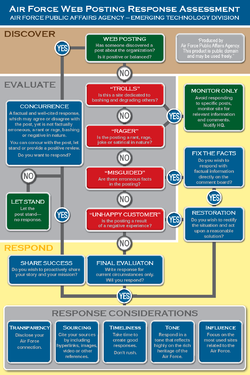
Motivation - First we used the Air Force blog response chart to talk about how to understand WHY people are commenting. Because understanding motivation is key to the reply.
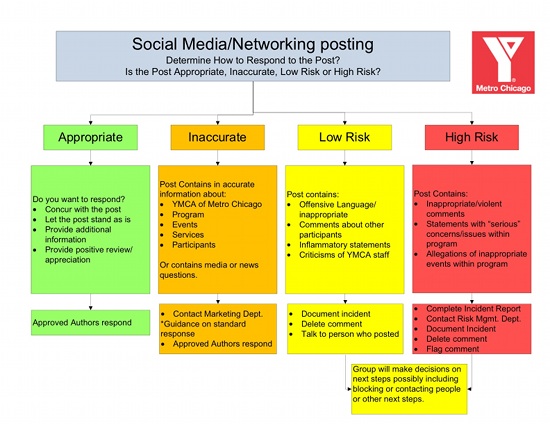
Respond - Then we had a comment response chart of our own to help them to decide if and how to reply\act.


That was our idea of how to prepare them.

Thursday, August 9, 2012

Recruit your team, define the roles (Give staff a voice! Part 4 of 10)

Social Media is marketing so they will do it. 

Nah, Social Media is all Tech so they will do it.

Wait, we are raising money right now so let the Fundraising team do it.

Nobody steps up, takes leadership and establishes a rule book, so eventually something bad happens or there are conflicts in what gets posted. Then all collaboration breaks down and one person or a small team controls everything. All posts have to be approved and everything gets filtered. In some ways that may seem appealing. And if that is the accepted culture in your org, then you may as well stop reading this post because you won't be enabling anyone...

But if you are ready to collaborate within defined roles with the same playbook, then read on.

First document who will be on the team, heck maybe even have tryouts or an application process. There are a number of ways to go about this. You could collect everyone that is interested and then determine what role and permission they will get. Or you could establish the structure and roles, then identify the people to fill them. Another approach would be to start small with some experienced players and grow as you learn what works.

But the key is to know who will play each of the roles.

  • Listening- who will be out there actively scanning for what is being said about your org, cause or brand
  • Monitoring- who will watch your channels for questions, comments, problems, inactivity, etc.
  • Managing- who will keep the tools working, identify tech changes, administer permissions, etc.
  • Planning- who will create the content calendar, define themes, focus the communications, define content frequency, etc
  • Posting- who be creating the content, keeping the pages updated, etc.
  • Promotion- who will spread the word about your social media efforts, run contests, create custom pages\content


And there may be more roles, but that is a good start. You might enjoy this article from the Content Marketing Institute to dig deeper.

Once you have the team and the roles then you need a Playbook. The glue that will hold this together is a content calendar (editorial calendar). As possible to supplement this content calendar there should be content templates. As the themes and business goals are defined, you can create standard text, flyer formats, images and other reusable content for others to pull from.

Here are some awesome articles on creating an editorial Calendar and process:
How To Create the Online/Offline Editorial Calendar - Razoo
DIY TOOLS FOR SOCIAL MEDIA MANAGEMENT - Amy Sample Ward
11 Editorial Guidelines Every Business Blog Needs - Hubspot

In my next post I will talk about the Comment Escalation Chart and how to make people comfortable with responding.

Monday, July 30, 2012

Metrics are just numbers without context! (Give staff a voice! Part 3 of 10)

Metrics, here, metrics there. Metrics everywhere. Everywhere you look everyone is talking metrics.

But does these numbers even matter or mean anything?

Example: Our website had 11,000 visits last month.

What does that even mean? Is that high? Was that unique or total? Is that better than last month? What did they do while they were there? So many questions.

You need to provide context to your numbers.  Try to answer these questions to help people understand the numbers:

  1. What do these numbers mean? (define the label of the metric)
  2. How do these numbers impact our goals?
  3. How does this compare to our history?
  4. Is there a benchmark that we can compare this to?
  5. How does this compare to peers?
Beyond providing a simple definition and some comparables though you also need to demonstrate how these metrics impact your organization's ability to meet the mission, operating goals and strategic plans. To do that you need to tie the metrics to the:

Business Objectives - Identify business objectives in your org that are impacted by your digital effors.

Engagement Goals - Set some goals for your reach and engagement in your digital channels based on those business objectives. This is an easy way to identify trends and set priorities.

Outcomes - Set up mechanisms and tools to track the objectives and goals above. Be sure to find a way to share these outcomes in a meaningful way with context.

Overall Marketing Strategy - Use your metrics to judge the outcomes of campaigns. But be sure to interpret them and apply those learnings. Help the business owners understand what worked and what didn't.

Example: We would like to increase online donations. We will use emails containing individual stories to drive traffic to our website. We hope to have an email open rate of 20%, which is 3% higher than past performance. However, our email open rate dropped for this campaign. That impacted our website visits because email is out top way to attract traffic. So our next plan should have a stronger email presence.


Anyway, if you only remember one thing, a metric is just a number until you know what question you are answering. 42.

Monday, July 16, 2012

What Gets Measured, Gets Done (Give staff a voice! Part 2 of 10)

"What gets measured, gets done." I have heard that said many times from a number of different people. It is so simple and true. HOWEVER, numbers and data are not as useful without a tie to goals and without context.

The first step in our process to enable digital editors was to create a set of metrics. We decided we wanted to keep the number of metrics fairly simple, balance reach vs. engagement and allow for comparison. We also set a goal for each of the metrics based on nonprofit benchmark reports, similar org stats and some simple math.

So our spreadsheet ended up with a row for each location, one section of columns for reach (size of audience) and one section of columns for engagement (audience interaction). The numbers do not paint a comprehensive picture for a detailed analysis, but they do provide enough insight to identify trends and gage performance.

And recently we have added a new section for Post Frequency. We are showing the # of blog posts on the website, date of last blog post, # of posts by admin on Facebook page and date of last admin post on Facebook. A key to our strategy is consistent and current content. The addition of these columns allows our leadership to easily review progress.

So we are measuring the work. So now what? stay tuned...

Tuesday, July 10, 2012

Give staff a voice! (Part 1 of 10)


Your staff, ALL of your staff, are potential advocates for your cause and have real expertise and experiences to share. However, the fear of writing and using online tools are real. Even with social media, smart phones and online activity taking over so much of our lives, your staff may hesitate to act as the voice of your cause online.

SO what do you do?

I have presented a session about Enabling Program Staff to be Digital Editors a few times now, but want to share my thoughts in a 10 post series. So here I go.

Gradually shifting the culture is the key to enabling digital editors. This is not a quick win, but there are quick wins to be had.

Gradually Shift the Culture
1.Publish Metrics
2.Establish Structure and Accountability
3.Remove Barriers
4.Regular Training and Resources
5.Enable Individuals while Maintaining the Brand

A deliberate effort is needed to build the voice of your organization to support and impact your cause. And the first step is to have a plan, which is pretty much always true.  The plan does not have to be a 200 line, detailed, gantt chart with pretty colors, load balanced, fully funded, leadership endorsed behemoth. It just has to be a plan that you will actually be able to act on. Don't create a plan bigger than your capacity.

Then pick a place and get started. Even though I numbered the steps above, you can go in whatever order your org needs. In fact, you may even need to add your own steps. I have had others indicate that they needed to consider some other steps like:
  • Fixing all of the tech - make it easy to use the tools to update website, email, social media, etc.
  • Get leadership support - either go direct and build a case with your leadership OR do some pilot efforts to show success, then keep getting those efforts approved. We learned the hard way that getting a strategy approved CAN be HARDER than getting a small pilot approved.
  • Get some expertise or a partner - if your org lacks the expertise to get this rolling, then look for a volunteer, partner or vendor to help. Don't forget all of the awesome resources from communities like www.nten.org or sites like www.socialbrite.org, www.idealware.org or www.techsoup.org.
Anyway, I  think you get the idea. Hope to talk to you in the next post where we jump into how to use metrics to enable program staff as digital editors. Thanks!

Tuesday, July 3, 2012

Getting Content Strategy started (an inner voice argument)

Ever feel like you are arguing with yourself?

Well I did that this morning on Twitter using my alter ego, I let my inner battle go public.

First, I found this great article! So I Scooped it.

But then I had a thought. So I posted from my other Twitter account:
yeah, ok
yeah but
nice
ah, yeah
cool
yep.

And that is a small glimpse of an inner argument. I usually win.


Friday, June 8, 2012

Is the dog eating your content homework?

"The dog ate my homework." 
My Dad accidentally put it in his briefcase and took it to work." 
"I put it in the safe, but lost the combination." 
"We don't have time for a content strategy."
We all had our share of lame excuses for not doing our homework and now we are adapting those excuses to our work. We need to find a way to hold ourselves accountable and get past the excuses.

Have you ever read someone's homework, like a paper they wrote for school. And as you are reading you can just tell that they didn't have a plan. Some paragraphs seem out of order and there isn't a clear message. The facts and information is cobbled together as if someone has a checklist they are following on what has to be included.

Doing your content planning homework will pay off. Stop making excuses.

Looking for ideas on how to get started in your content planning? I have a collection of great links here:
http://delicious.com/stacks/view/U0OaNx 

What are your excuses? Or what resource do you suggest for someone who is just starting with content planning?

NOTE: I really only created this post to use the adorable photo of the Leader Dog my family is training to be a seeing eye dog.